
Creating an ebook reader app is tough. Parsing text, building annotation features, and making sure everything renders well are all abstraction layers stacked on top of one another. Even when prebuilt libraries are used, carving out features and wiring them together adds its own complexity.
One line description
RILearn is an attempt to build an online, hosted ebook reader in as little time as possible. The app lets you read a book, listen via text-to-speech, annotate, and embed notes — all in the browser.
What it does
What started as a university assignment became one of the projects where I learned the real intricacies of how an ebook reader works:
- Reading & rendering — clean, paginated reading view for long-form text.
- Text-to-Speech (TTS) — listen to books with assistive, on-device or cloud narration.
- Annotation & notes — highlight passages and embed notes directly into the text.
- Progressive Web App — installable, offline-capable, and accessible from any device.
 Figure 1 — The reading experience, designed to work across devices as an installable PWA.
Highlights
- Listen as you read — the TTS engine narrates the current passage, with controls to pause and resume.
- Accessibility-first — narration makes long texts approachable for more readers.
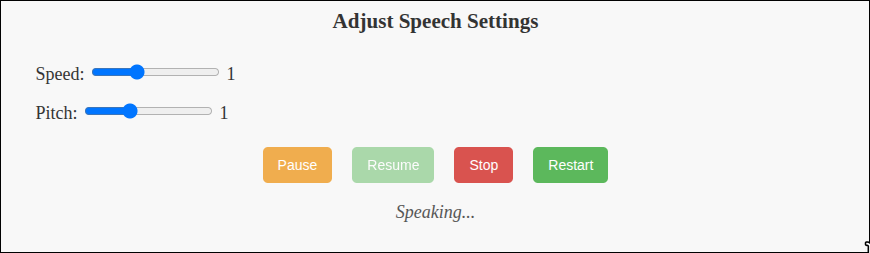 Figure 2 — The TTS panel alongside the reading view.
- Inline dictionary — select a word to pop up a definition without leaving the page.
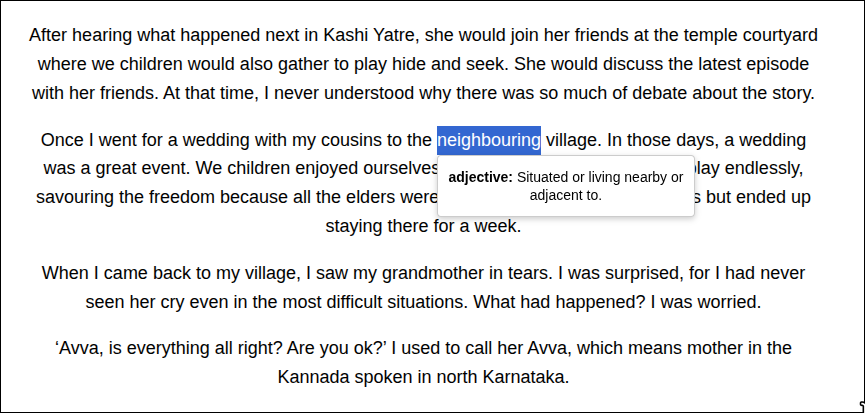 Figure 3 — The popup dictionary keeps comprehension flowing without context-switching.
Deployment
RILearn is built as a Progressive Web App and is deployed live on Netlify, so it installs to a home screen and works offline after first load.